


Enhanced Screening and Results with Smart Alert Filtration
This release focuses on Smart Alert Filtration (SAF), a configurable post-screening filtration layer with attribute-based rules, enabling false positive reduction and deterministic compliance controls while leaving core screening logic untouched.
SAF Settings – greater control, flexibility, and transparency in screening outcomes
Compliance teams need effective control over how screening alerts are filtered, with clear visibility into the rules applied and how each decision is reached. This product update introduces an enhanced Smart Alert Filtration configuration experience, giving administrators greater flexibility in managing attribute-based rules while improving transparency for investigators.
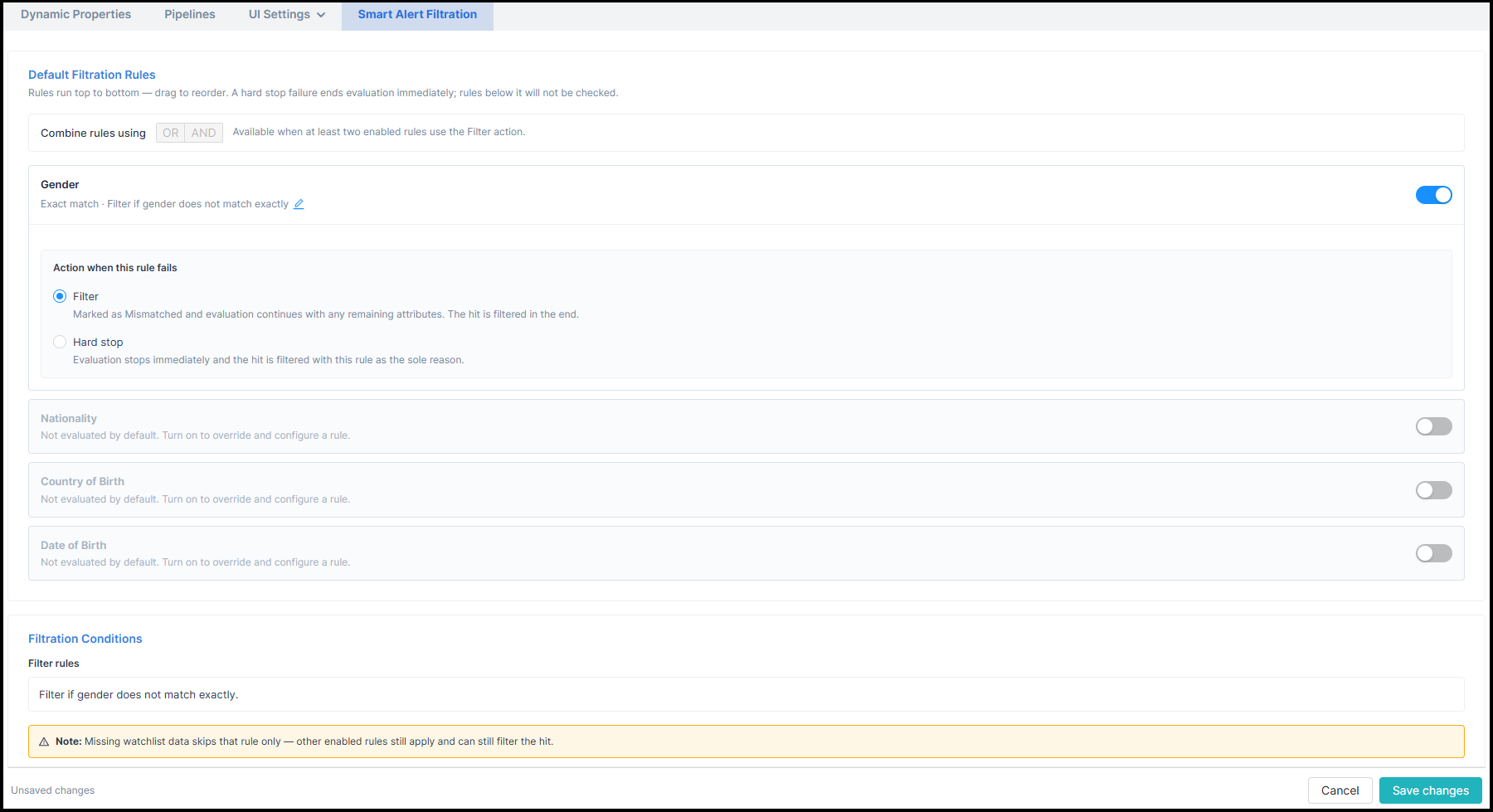
A new Smart Alert Filtration tab in Settings introduces a centralised configuration experience covering four customer attributes: Date of Birth (DOB), Nationality, Gender, and Country of Birth.
- Flexible rule configuration: Administrators can enable or disable individual attributes, configure their rule options, and assign an action of Filter or Hard stop. All filters are off to preserve existing behaviour, with configurable defaults once enabled.
- Configurable execution order: When two or more attributes are enabled, administrators can drag and reorder attribute cards to determine execution priority. Hard stop rules can terminate further evaluation when triggered.
- Combined AND/OR filtration logic: A single configuration-wide operator controls how all enabled Filter-action attributes are combined, allowing administrators to choose whether any or all configured conditions must be met.
- Enhanced attribute rules: DOB supports exact matching or a configurable symmetric ± threshold of 1–20 years. Nationality supports exact matching or a searchable country exclusion list displaying ISO two-letter codes alongside country names. Gender and Country of Birth retain automatic exact matching when enabled.
- Simplified configuration management: All changes are staged and saved together through page-level Cancel and Save changes controls. An unsaved changes dialog helps prevent accidental loss of configuration updates.
- Clearer filtration conditions: The Filtration Conditions section separates numbered Hard stop rules from a consolidated Filter rule sentence, making the configured logic easier to understand. Long nationality exclusion lists are shortened using a "+N more" indicator.
{{product-cta-1}}
SAF Matching Configuration – more integrated filtration controls and greater configuration transparency
This product update enhances the Matching Configuration experience by integrating Smart Alert Filtration settings into the configuration workflow, making it easier for analysts to review, manage, and maintain consistent filtration behaviour across configuration lifecycle stages.
- Integrated Smart Alert Filtration configuration: Date of Birth (DOB), Nationality, Gender, and Country of Birth parameter tabs now include inline filtration rule settings, allowing analysts to configure or override rule types and Filter/Hard stop actions directly within the matching configuration workflow. Default configurations are taken from organisational SAF Settings, but can be overridden for each Matching Configuration. Later changes to Settings do not affect existing configurations.
- Enhanced configuration review: A new Review pop-up consolidates the complete configuration summary, including watchlist, whitelist, attribute weightages, Smart Alert Filtration rules, execution order, and Filtration Conditions. Analysts can review all configured settings before saving. View Details returns them to the same configuration parameter step for further review.
- Improved configuration visibility and control: View Details and Edit Details links provide access to individual matching parameter values. The Summary view offers a simplified Configuration Parameters table showing Attribute, Weightage, and Total, while filtration settings can be reviewed or modified through their dedicated section.
- Consistent rule configuration: The inline attribute settings reuse the same underlying rules and components as Smart Alert Filtration in Settings. DOB threshold and Nationality exclusion-list configurations behave consistently across both experiences. The DOB threshold input is displayed only when Threshold based is selected.
{{product-cta-2}}
SAF in Case Manager – greater visibility into filtered hits and more transparent investigation outcomes
Compliance investigators need visibility into not only the hits retained in a screening alert, but also those filtered by Smart Alert Filtration. This product update enhances Case Manager by introducing clearer filtration indicators, detailed explanations, and downloadable filtration information, enabling investigators to better understand screening outcomes and maintain a complete audit trail.

Smart Alert Filtration information is now available across all screening alerts in Case Manager, whether accessed directly through Alerts without Cases or from within an existing Case.
- Retained and Filtered hit counts: The existing Number of Hits field now distinguishes between retained and filtered hits. For example, "20 Retained · 2 Filtered". Where no hits are filtered, only the retained count is displayed. Counts remain consistent across Alert Details, the hit table, and Alert Download.
- Clear filtered hit identification: Filtered hits are marked with a Filtered indicator alongside the existing Hit Level information. Existing hit details, including Hit Score, watchlist information, attribute scores, and watchlist categories, remain available
- Detailed Filtration Evaluation: A new "Why filtered?" action allows investigators to view the detailed filtration evaluation for an individual hit.
- Preserved investigation capabilities: Existing Alert Details functions, including Search, Filter, Sort, Whitelist filtering, Compare, and Take Action, remain available. These functions operate on the currently displayed hit set without recalculating filtration.
{{product-cta-3}}